You approve a label design on your computer, and the colors look bright, balanced, and exactly right. But when the finished labels arrive, the blue looks darker, the pink appears less vibrant, or the background color seems slightly different. For brands ordering custom labels, this can be frustrating, especially when packaging consistency is important.
The difference does not always mean there is a printing defect. Printed labels and digital artwork reproduce color in different ways, and several factors can affect the final result. Understanding label color variation helps buyers set realistic expectations, prepare artwork correctly, and communicate more clearly with their printing suppliers.
In this guide, we explain why printed label colors may differ from a design file, how to improve label color matching, and what to confirm before approving a production order.

1. RGB and CMYK: Why Screen Colors Change in Print
One of the most common reasons for color differences is the distinction between RGB and CMYK.
RGB stands for red, green, and blue. It is the color model used by digital screens, including computers, tablets, and smartphones. Screens create colors by emitting light, which allows them to display highly saturated and luminous shades.
CMYK stands for cyan, magenta, yellow, and black. It is widely used in commercial printing, including many label printing processes. Instead of emitting light, printed inks absorb and reflect light from the material underneath.
Because these systems reproduce color differently, not every screen color can be reproduced exactly with standard CMYK inks. Bright blues, vivid greens, intense oranges, and fluorescent-looking shades are particularly likely to change during conversion.
For example, an electric blue logo on a monitor may look deeper or slightly more purple on a printed label. A bright pink may become softer, while a vivid green may appear less saturated.
To reduce unexpected label color variation, prepare artwork using the printer's recommended color settings and review the converted colors before production. CMYK artwork can make the print workflow more predictable, but it does not guarantee an exact match on every material or printing machine.
2. Your Monitor May Not Show the Actual Printed Color
Even when a design file is prepared correctly, your monitor can influence how you perceive its colors.
Screen brightness, contrast, color temperature, and calibration all affect the displayed image. A design viewed on a bright laptop may appear more luminous than the same design on another monitor. A phone with a vivid display may make reds and blues look more intense than they appear in print.
This is why a digital PDF proof is useful for checking layout, text, logos, and artwork positioning, but it should not automatically be treated as an exact color reference.
If brand color accuracy is important, ask your label supplier which proofing options are available. A physical printed proof or sample made with the intended material and finishing process can provide a more meaningful reference than a screen image alone.
For businesses ordering custom product labels, this step is particularly valuable when the packaging uses a distinctive brand color or when the labels must match existing products.

3. Label Material Can Change How Colors Look
The material beneath the ink has a significant influence on the appearance of the finished label. The same artwork may produce different visual results on white paper, transparent film, metallic material, or textured paper.
White paper and coated materials
White materials provide a relatively neutral background for printed colors. Their surface properties, coating, brightness, and absorbency can still affect how ink appears.
A smooth, coated surface may produce a different level of color saturation and gloss compared with an uncoated or textured paper. Therefore, a color reference approved on one material should not automatically be assumed to look identical on another.
Clear labels
Transparent materials allow the surface or product behind the label to influence its appearance. Without a suitable white ink layer, printed colors may look less opaque or may blend visually with the container and its contents.
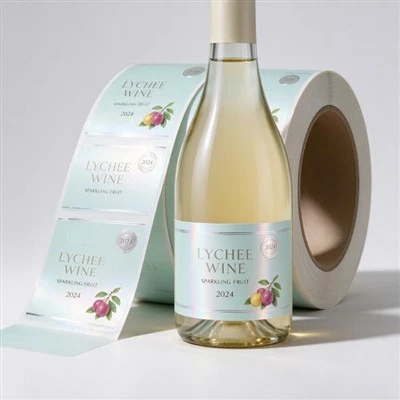
For products packaged in clear bottles, 【Clear BOPP Labels】 can create a clean, transparent appearance. However, if the design contains bright colors or a white background, discuss white ink coverage with the printer before production.
Metallic labels
Gold and silver materials introduce reflections that can change the way printed colors are perceived. Colors printed directly onto a metallic surface may look more reflective or different in tone than the same colors printed on white stock.
For premium packaging, 【Metallic PET Labels】 can create a distinctive appearance, but the final effect depends on both the material and the artwork.
Colored and textured materials
Kraft paper, colored substrates, and textured surfaces can also influence the finished color. A dark or warm-colored background may reduce the brightness of some printed shades, while texture can make solid colors appear less uniform.
When selecting 【Custom Cosmetic Labels】 or other packaging labels, evaluate the material and artwork together rather than choosing them independently.

4. White Ink Can Make a Major Difference
White ink is especially important when printing on transparent, metallic, or colored materials.
On a clear label, a white ink layer can provide an opaque foundation beneath selected design elements. This helps printed colors appear closer to their intended appearance instead of allowing the product or background to show through.
On metallic material, white ink can also cover selected areas to create contrast between a non-metallic printed color and an exposed reflective surface.
However, the result depends on where the white ink is applied, its opacity, and the intended visual effect. Printing white beneath the entire design creates a different appearance from applying it only beneath specific graphics.
Before ordering, explain whether you want the finished label to look opaque, transparent, metallic, or a combination of these effects. Providing a clear visual reference helps the printer understand your expectations.
5. Printing Methods and Finishes Affect Color Appearance
Different printing processes have different production characteristics. Digital printing and offset printing can both produce high-quality labels, but the final appearance depends on the equipment, inks, material, color settings, and finishing requirements.
In CMYK label printing, the color result is influenced by the printing system's available color range and how the artwork is processed. Color management and consistent production settings help reduce unwanted variation.
For additional background, read 【UV Digital Printing: How This Advanced Printing Technology Works】 to understand how digital printing can support label production.
Finishing processes can also change how colors are perceived:
Gloss lamination: Creates a shiny surface that can make colors appear more vivid or visually rich.
Matte lamination: Reduces surface reflections and produces a softer, less glossy appearance.
Gold or silver foil: Adds a reflective metallic effect that differs from ordinary printed ink.
Spot UV: Creates localized gloss, adding contrast between treated and untreated areas.
These effects do not simply decorate the label; they influence its overall appearance. If your design relies on a particular combination of color and surface finish, approve the combination rather than evaluating the ink color alone.

6. Why Can the Same Label Have Different Colors Between Orders?
A brand may notice that a new batch of labels looks slightly different from a previous order, even when the artwork has not changed.
Several factors may contribute to this label color variation, including differences in material batches, printing equipment, color settings, ink behavior, and finishing conditions. Changes in the substrate or white ink construction can also affect the result.
This does not mean every production run will have a noticeable difference. It means that brand-critical colors need a clear reference and an agreed method of evaluation.
For recurring orders, consider the following practices:
Keep the approved artwork file and its color specifications.
Record the label material, finish, and printing requirements.
Retain an approved physical sample when practical.
Tell the supplier which brand colors are most critical.
Agree on the acceptable color tolerance and evaluation method before mass production.
If the same label will be ordered regularly, these records help both parties understand what the next production batch should match.
For more information about print production, see 【CMYK Offset Printing for Labels】 and discuss your color requirements with your supplier before confirming the order.
7. How to Improve Label Color Matching Before Mass Production
You do not need to eliminate every possible color difference to achieve a reliable result. The goal is to identify important colors early and reduce avoidable surprises.
Step 1: Prepare print-ready artwork. Confirm the file format, color mode, image resolution, fonts, and other requirements with your supplier. Review saturated colors after RGB-to-CMYK conversion.
Step 2: Specify important brand colors. If you have an established brand color reference or Pantone code, provide it with the artwork. A reference code helps communicate the target, but the achievable result still depends on the material and printing process.
Step 3: Confirm the exact label material. Do not approve color on white paper if the final label will be printed on transparent film or silver PET. The substrate can change the visual result.
Step 4: Confirm white ink and finishing requirements. Explain whether the design needs white underprinting, exposed metallic areas, gloss lamination, matte finishing, or other special effects.
Step 5: Request an appropriate physical proof. When color is commercially important, ask whether a printed sample using the intended material and finish is available. A digital proof alone is not sufficient for exact color approval.
Step 6: Keep a written approval record. Confirm the approved artwork, material, finish, and color reference before mass production. If any of these specifications change, review whether a new proof is needed.
If you are also evaluating label adhesion and performance, read 【How to Test Label Adhesive Before Mass Production】. Color accuracy and physical performance are different considerations, but both matter when approving a label for commercial use.

Conclusion
When printed labels look different from artwork, the cause may be the RGB-to-CMYK conversion, monitor settings, label material, white ink, printing process, or surface finishing. These factors can work together, so changing only the artwork may not solve the problem.
For better label color matching, prepare print-ready files, specify brand colors clearly, evaluate the actual label material, and approve a suitable physical proof when necessary. For repeat orders, maintaining consistent production specifications and a reliable color reference can also help reduce unwanted variation.
At SpeedPrint, we support custom label projects with material and printing options tailored to different packaging requirements. Whether you need transparent bottle labels, metallic cosmetic labels, or other custom printed labels, discussing the intended appearance before production helps establish clearer expectations and a smoother ordering process.
FAQ
1. Why do my printed labels look duller than the design on my screen?
Screens emit light and can display more saturated colors than standard CMYK printing can reproduce. When bright RGB colors are converted for printing, some shades may appear less vivid.
2. Should I design labels in RGB or CMYK?
For commercial printing, CMYK artwork is often a practical starting point. However, follow your supplier's file requirements and review the converted colors, especially for bright or highly saturated shades.
3. Can a Pantone color guarantee an exact match?
A Pantone reference provides a standardized color target, but it does not guarantee identical results across every material and printing process. The substrate, ink system, finishing, and agreed production tolerance all matter.
4. Why do colors look different on clear labels?
Transparent materials allow the background or product behind the label to affect the appearance. White ink can help create opacity and improve color visibility, depending on the design and print construction.
5. How can I make sure my labels match my brand colors?
Provide clear color references, confirm the final material and finish, request a physical proof when color is critical, and retain an approved sample or production specification for future orders.
References
Avery: Why Is the Color on My Screen Different from What Is Printing?
Avery UK: RGB vs. CMYK for Label Design
Printing United Alliance: White Ink as a Color-Management Variable